Introduction:
In this blog post, I’ll discuss the challenges faced when trying to set up email alerts in Oracle Enterprise Manager (OEM) and the solutions found during the troubleshooting process.
Setting Up Alerts in OEM:
There was a recent production issue due to TEMP getting filled up. While we have OEM set up, we received no alert. So I deep dived into the OEM Alert setup along with my co-worker to figure out what went wrong.
We already set up alerts in OEM by enabling the ‘Tablespace Space Used (%) (Temp)’ metrics under Enterprise > Monitoring > Monitoring Templates > DBMON_Template (for Target type Database Instance). Then we checked incident rules for these metrics under Setup > Incidents > Incident Rules > APPS_MON_RULESET > Metric Alerts.
Despite these steps, we were not receiving email alerts in our inbox. A web conferencing session was conducted with Oracle support to address the issue. Several key points emerged from this session:
- Metrics can exist on different target types in OEM. Oracle support pointed out that we were trying to modify metrics at both PDB and DB Instance levels.
- The settings for tablespace metrics should be modified on the PDB template (PDBMON_TEMPLATE for Pluggable Database) and not on Database instance template (DBMON_Template for Database Instance)
- Similarly, after analyzing the incident rule settings, it was found that we restricted alerts for the Database instance target type rather than the PDB
- Since the targets were part of an admin group/template collection, it required manual synchronization.
- Event triggers may not occur immediately and may be subject to scheduled metric collection.
We made the following changes based on the above recommendations.
Enterprise > Monitoring > Monitoring Templates > PDBMON_Template (for Target type pluggable database) -> Metric Thresholds

Setup > Incidents > Incident Rules > APPS_MON_RULESET > Metric Alerts.

Oracle support explained that new rule modifications wouldn’t affect old events. To trigger new events, thresholds needed to be adjusted to generate a clear severity and then generate new warning/critical severity.
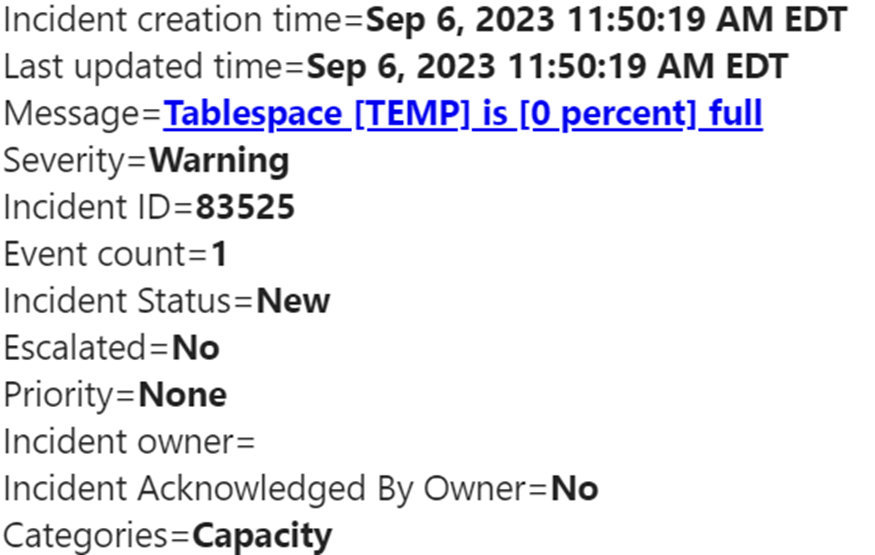
Also, a 30-minute delay between the creation of alerts and incidents was noted. This delay is normal and depends on the metric collection schedule. In this case, the Temp tablespace metric collected data every 30 minutes.
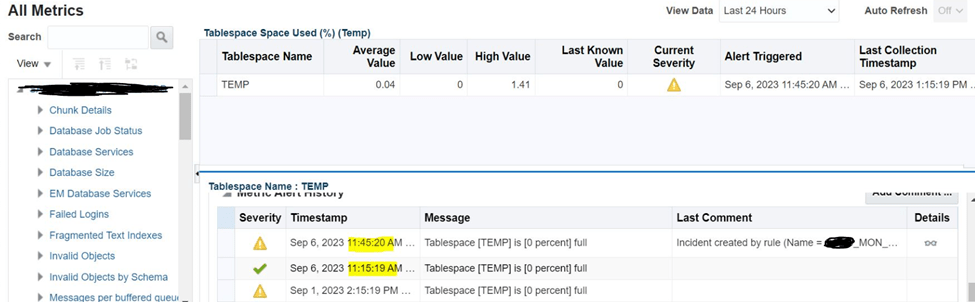
We finally received OEM Email notification

Conclusion:
Setting up email alerts in Oracle Enterprise Manager can be complex, but understanding target types, incident rules, and metric collections is crucial. Simplifying incident rules and ensuring they apply to the correct targets can help resolve issues and improve alert responsiveness. This summary provides an overview of the troubleshooting process for email alerts in OEM and highlights key points to consider when facing similar challenges.
 Tech Talks with Indraneil